UX Health Snapshot
A compact read on the overall state of the interface, including the clearest usability risks and evidence limits.

UX Heuristics Compass is a local-first AI-assisted UX audit tool for reviewing visible interfaces before they ship. It turns screenshots, page captures, and short task-flow evidence into structured heuristic findings, evidence limits, and a practical next-fix list.
A quick orientation for UX people: what this is, why it exists, and where it fits in a real UX workflow.
UX Heuristics Compass is an audit assistant for visible user experience evidence. It can review a website page, app screen, prototype screenshot, small page capture, or bounded task-flow note and turn that evidence into a scored usability readout.
It is meant for the moment before a design review, handoff, portfolio critique, stakeholder conversation, or early QA pass, when you want a sharper read than generic AI commentary but you do not yet have time for a full research cycle.
A compact read on the overall state of the interface, including the clearest usability risks and evidence limits.
Ratings organized around Nielsen Norman Group's core heuristics plus optional accessibility, inclusion, journey, and UX-writing profiles.
A ranked set of issues with observed evidence, severity, recommendation, confidence, and suggested next validation.
This does not replace usability testing with real people. It helps you catch obvious or likely UX problems earlier, prepare better review conversations, and decide what to validate next.
The tool keeps the UX review grounded: first in visible evidence, then in heuristic structure, then in human calibration where the AI needs context.
A loading delay, hidden exit, or lost progress path can be minor in one product and critical in another, depending on the audience and task.
The report names what was and was not captured so readers do not mistake a bounded heuristic audit for a full research study.
The tool should point to the next real check: a usability test, accessibility scan, engineering verification, or follow-up research question.
| Mode | Use it when | Typical output |
|---|---|---|
| Quick audit | You need a fast read on a screenshot or small page capture. | UX Health Snapshot, top findings, one concrete next action. |
| Full checklist audit | You want scored findings across the active heuristics. | Per-heuristic scorecard, issue ledger, evidence limits, fix order. |
| Human-loop audit | The interface context affects severity or report readiness. | Calibration questions, revised priorities, report-ready payload guidance. |
| Multi-perspective audit | You want several expert lenses without pretending there was a real user study. | Evaluator disagreements, shared priorities, evidence that would change the rating. |
You can try the prompt-only version today while the downloadable packages remain locked for beta verification.
Pick one bounded artifact: a screenshot, a prototype frame, a public page capture, or a short task-flow description. Avoid asking for a full-site audit on the first pass.
The first useful result should identify the top usability risk, what evidence supports it, what the audit cannot know yet, and the smallest worthwhile fix.
Use UX Heuristics Compass for a quick audit.

Review this interface evidence:
"""
[Paste screenshot notes, page text, URL capture notes, or a short task-flow description here.]
"""

Audience:
[Who is this for?]

Task:
[What should the user be able to do?]

Focus on visible usability issues, likely user confusion, severity, evidence limits, and the top fix to make first.

Return a compact UX Health Snapshot, the top 5 findings, and one concrete next action.The public landing page is live, but package downloads are intentionally disabled until plugin, MCPB, skill, source, and checksum assets are verified. Use the prompt path first.
The Oppia.org example shows the kind of public-safe report UXHC can produce when it has bounded page evidence and human calibration.
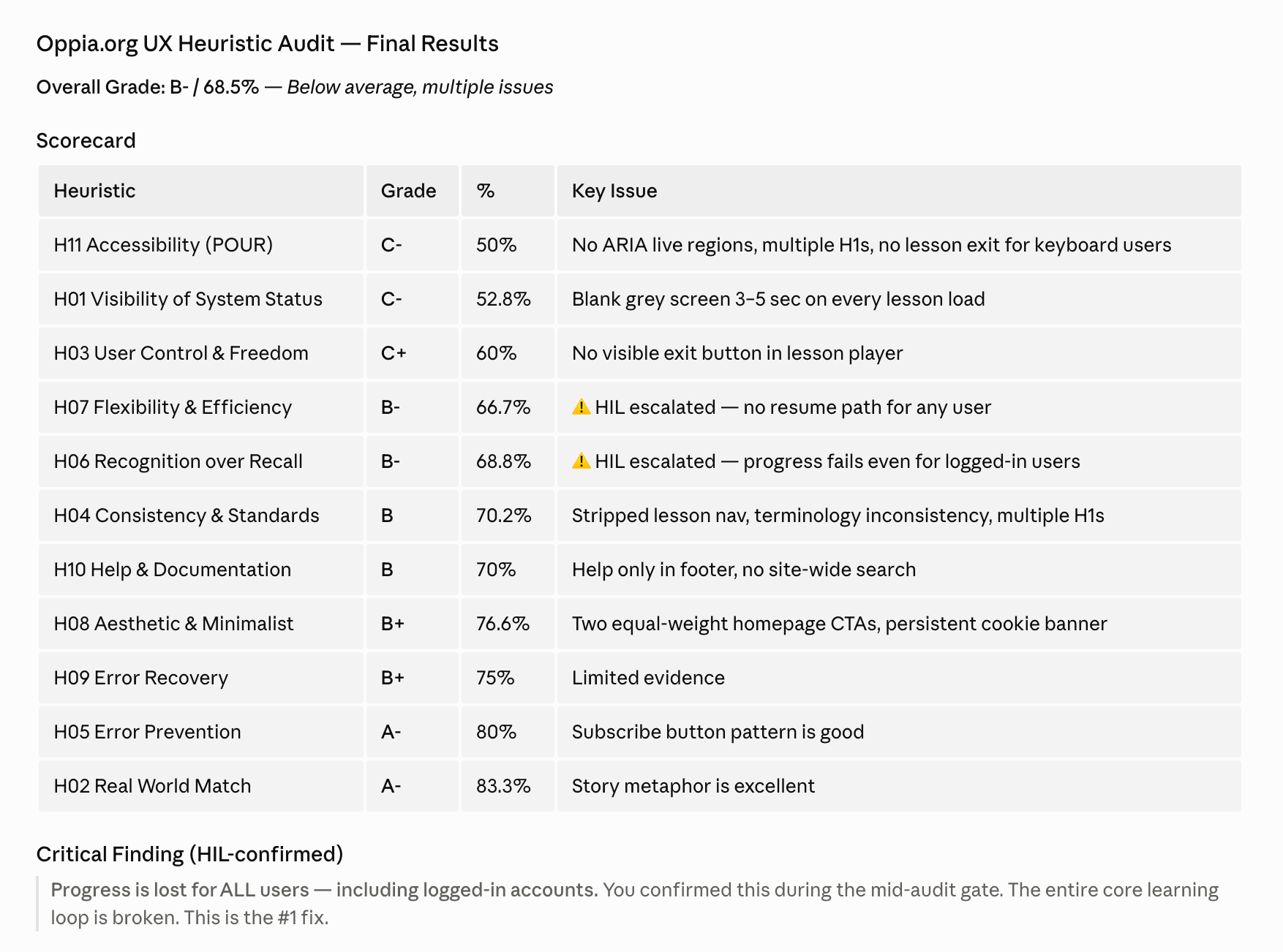
The report does not just list issues; it elevates progress loss as the number-one fix because it breaks the learning loop.
Severity is interpreted through the product context: free education for under-resourced learners changes how loading, progress, and navigation problems should be weighed.
The report names what was captured and what still needs validation, including accessibility testing, mobile checks, and engineering confirmation.
| Signal | Result |
|---|---|
| Overall grade | B- / 68.5%, below average with multiple issues. |
| Top finding | Progress is lost for all users, including logged-in accounts. |
| High-priority themes | Progress persistence, lesson loading feedback, visible exit path, screen-reader loading state. |
| Important caveat | The audit was bounded to selected pages and is not a full WCAG compliance test. |
This section explains the AI and MCP layer in practical terms without requiring readers to know protocol details.
MCP stands for Model Context Protocol. In plain language, it is a way for an AI assistant to connect to a real local tool instead of only replying with freeform text.
For UXHC, that means the host AI can use structured local helpers for source preparation, heuristic lists, audit scoring, validation, report generation, preferences, and multi-perspective review. The user still decides what evidence to provide and what to trust.
Interprets screenshots, asks questions, explains findings, and adapts the conversation to the reviewer.
Owns the rubric data, tool contracts, scoring structure, report-readiness checks, and local report artifacts.
Provides context, checks whether severity makes sense, validates findings with real users or implementation evidence, and decides what ships.
UXHC is a heuristic review assistant, not a full UX research platform, crawler, analytics system, or autonomous browser agent. Its beta scope is intentionally bounded so outputs stay reviewable and useful.
| Surface | Status |
|---|---|
| Prompt-only use | Available through the public page prompts. |
| Claude Cowork plugin | Planned, pending package build and clean scan. |
| Claude Desktop extension / MCPB | Planned, pending manifest and tool-surface verification. |
| Skill and source packages | Planned, pending review and checksums. |
The useful feedback is not whether the page sounds impressive. The useful feedback is whether a UX practitioner would trust it, try it, and know where it belongs.
The part that made the tool feel useful, credible, or worth trying.
The part that felt confusing, too technical, too generic, or not grounded enough.
A type of interface or UX situation that would make the tool easier to judge.
Open the UXHC page, skim the Oppia example, and try one quick audit prompt on a screenshot or flow you already know well. That will show whether the tool helps you think more clearly or just adds ceremony.
Open UX Heuristics CompassView the Oppia Example ReportTry a Quick Audit Prompt